Unrecorded time
Manual timesheets rely on memory. Memory rounds down. The work happened; the entry never did.
Legal practice management software
Smokeball sits on top of the way a law firm actually runs — the emails, the calls, the drafting, the client money — and turns all of it into a complete matter file. Time records itself. Documents build themselves. Trust stays reconciled. You practise law instead of reconstructing your day at 6pm.
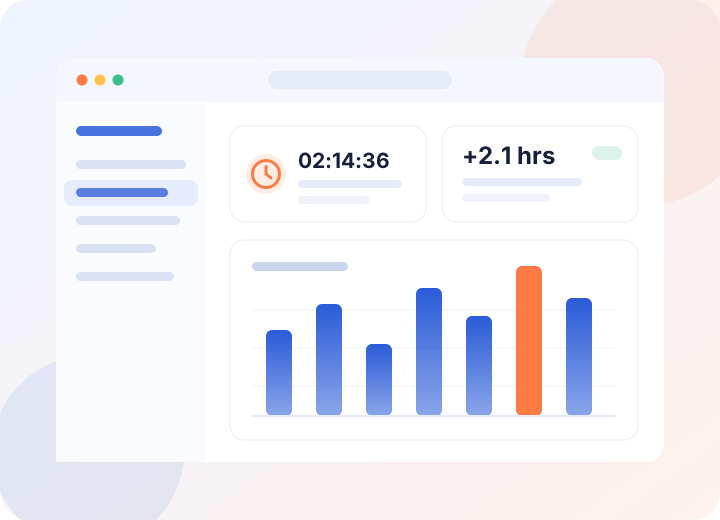
Figures shown are illustrative of typical firm outcomes and are not a guarantee of results.
The context
A six-minute call. A quick email from the car park. Twenty minutes reformatting a letter that should have been a template. None of it feels big enough to write down, so it isn't — and by the end of the month a firm has quietly given away a day and a half of work per fee earner.
Manual timesheets rely on memory. Memory rounds down. The work happened; the entry never did.
The same engagement letter, retyped for the ninth time this month, with the client's name in three places to get wrong.
Client money in a spreadsheet beside the practice's own ledger is a compliance problem waiting for an audit letter.
The matter lives in six places — inbox, desktop, shared drive, a notepad — and no one place tells the whole story.
Smokeball is a single system for running matters end to end: intake, contacts, calendars, documents, email, time, billing and trust. Its distinguishing idea is that the software should observe the work rather than interview you about it afterwards. Activity on a matter is captured as it happens, attached to that matter, and made billable with one click — so the record is complete before anyone sits down to reconstruct it.
Three pillars
Automatic time tracking
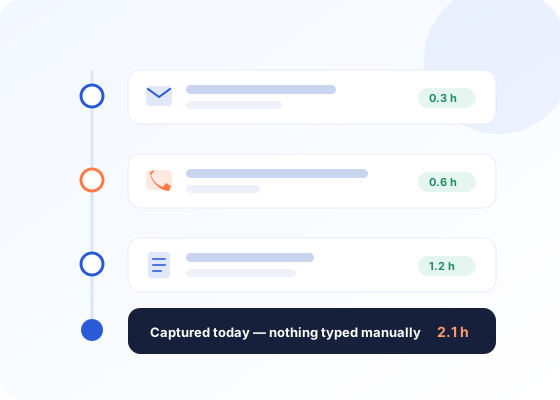
Smokeball's activity capture runs quietly in the background across your desktop, email and phone. Open a document on the Hargreaves matter, spend eleven minutes in it, send two emails and take a call — all four events land on that matter's timeline with durations already attached.
Document automation
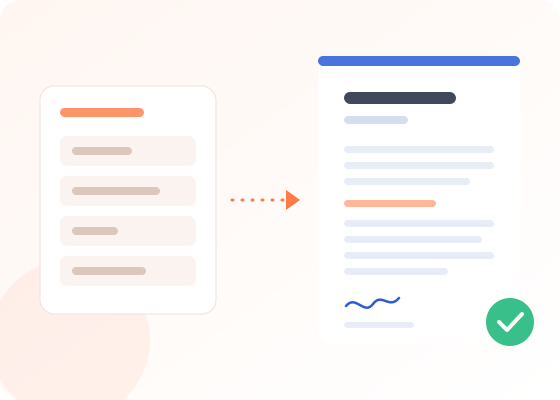
Every detail you capture at intake — parties, dates, addresses, matter numbers, fee arrangements — becomes a field. Choose a form or letter and Smokeball merges those fields into a finished document in Word, correctly formatted, ready to check and send.
Trust accounting & billing
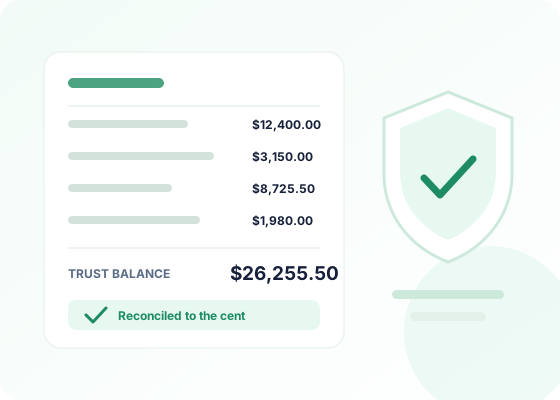
Trust accounting is built into the same system as the matters and the invoices, not bolted on beside it. Client funds are held in their own ledgers, separated from operating funds, with every movement recorded against the matter it belongs to.
How it works
Intake details, contacts, key dates and the fee arrangement are captured once and become the matter's single record.
Email, draft, call, meet. Smokeball watches the activity and attaches it to the matter with time already measured.
Pick a template; the matter's fields fill it. The finished document files itself back to the matter.
Scan the day's captured entries, adjust rates or descriptions, mark what's billable, and approve in a single pass.
Raise the invoice from approved time, draw on trust where authorised, and keep the ledgers reconciled.
Desktop, web and mobile
A call taken on the way to court is still billable work. The mobile app captures time, notes and expenses away from the desk and syncs them into the matter, so the file is current when you get back to it — and so is everyone else's view of it.

Who it's for
Firms where the people billing the work are also the people running the business — and where an hour spent on administration is an hour that never reaches a client.
High document volume, sensitive deadlines, and constant short client contact that manual timesheets miss.
Repeatable workflows and heavy form work — the clearest case for automation there is.
Long-running matters where the file has to hold years of correspondence and still make sense.
Contingency work where knowing the true cost of a matter decides whether it was worth running.
Form-driven, deadline-driven, and unforgiving of a detail entered inconsistently across documents.
Mixed caseloads that need one system rather than a different tool for each kind of matter.
FAQ
The practical ones — about surveillance, migration, compliance and cost.
No — the purpose is different, and so is the design. Activity capture records work against matters so it can be billed and evidenced; it is not a productivity score or a keystroke log. Captured entries stay in the fee earner's own daily review until that person approves them, and nothing becomes an invoice line without a human decision. Firms should still tell their people it's running and explain what it does — that conversation is what turns it from surveillance into a tool staff actually want.
They come with you. Migration typically covers contacts, matter records, documents and historical billing data from your existing practice management system, spreadsheets or shared drive. Onboarding is run as a structured project — data is mapped, imported into a test environment, checked with your team, then made live — so you are not cutting over on faith. Your existing precedent documents can also be converted into automated templates as part of the setup rather than being rebuilt from scratch.
Trust accounting is built to the separation, record-keeping and reconciliation principles that bar and law society rules are based on: client funds held in distinct ledgers, no commingling with operating funds, every transaction tied to a matter, and three-way reconciliation between bank, ledger and client balances. Specific requirements vary by state and jurisdiction, so confirm the details for yours with our team during your demo — and note that compliance always remains the firm's responsibility, with the software's job being to make it straightforward to evidence.
Most small firms are working in the system within days of data migration, with the deeper habits — document automation, trust workflows, reporting — settling over the first few weeks. Training is included and delivered role by role, because what a principal needs to know and what a paralegal needs to know are different. The realistic expectation is a short dip in speed during the first week, followed by the time savings compounding as more of the firm's standard documents move into templates.
Firm data is stored in the cloud with encryption in transit and at rest, backed up, and reachable from the desktop, web and mobile apps. Access inside your firm is governed by user-level permissions, so staff see the matters their role requires. Client confidentiality and privilege obligations sit at the centre of how the platform is built — ask for the current security and data-residency documentation during your evaluation so your firm can record its own due diligence.
Yes. Smokeball is designed around the tools legal teams already use rather than replacing them: documents are produced and edited in Microsoft Word, email is captured from Outlook and filed to matters, and calendars stay in sync. Accounting integration lets billing and trust information flow through to your bookkeeping rather than being entered twice. The list of supported integrations changes over time, so confirm the specific tools your firm relies on before you commit.
Pricing is per user per month and depends on the edition your firm needs — the entry tier centres on matter management and document automation, while higher tiers add full billing and trust accounting. Because the right tier depends on firm size, practice areas and whether you need trust, pricing is quoted after a short scoping conversation rather than listed as a single number. Ask for the current rate card and the total first-year cost including migration and training so you are comparing like with like.
Often it is the clearest case, because a solo has no one to delegate administration to. The maths is simple: if automatic capture recovers even an hour of otherwise unrecorded work a week and templates remove a few hours of drafting a month, the subscription is repaid by billable time you were already earning but not recording. Work it out against your own hourly rate before you decide — and if the numbers don't hold for your practice, they won't hold after a demo either.
A demo walks through your practice area with your document types — so you can judge the time savings against real work rather than a sample file.
No obligation. Ask for pricing and migration scope in the same call.